In Part 3 of his BNI Education Slots series, Darren Jamieson explains how a free Google Business Profile can help a BNI chapter attract a steady stream of potential visitors.
He begins by comparing two Google searches. A search for BNI Roman shows the chapter’s regional website, Facebook page, LinkedIn page and X account, but leaves a large blank space beside the results.
By contrast, a search for BNI Chester displays a prominent Google Business Profile containing photographs, meeting details, directions, contact information and links to the chapter’s website.
Most importantly, potential visitors can click directly through to a landing page and book a visit.
What a Chapter Profile Can Include
Darren demonstrates how a chapter can use its profile to display:
- Its meeting location and opening hours
- Photographs of the venue and chapter
- A phone number and website link
- Posts and updates
- Reviews from members
- A direct visitor-booking option
BNI Chester also uses the product section to promote a “BNI Chester Visit.” The listing includes the price, a short description and a direct booking link.
Darren explains that this is one of the most useful but often overlooked features of a Google Business Profile.
Tracking Visitor Interest
The profile also provides statistics showing how people interact with the listing.
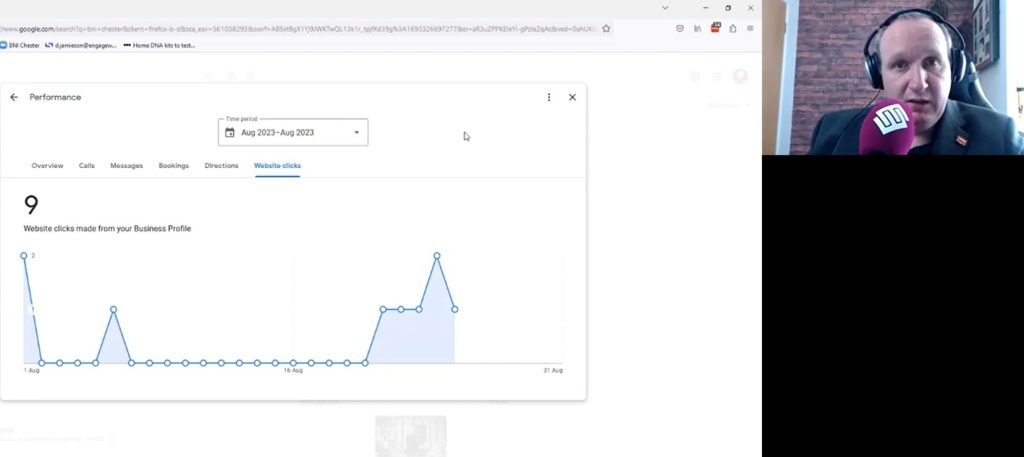
In the example shown, 31 people had requested directions to the BNI Chester venue and nine had clicked through to the website.
These figures demonstrate that people are actively discovering the chapter through Google and may go on to book a visit.
Darren particularly values the passive nature of this approach. Once the profile is set up, it can continue generating visibility without paid advertising or regular effort.
Reviews and Updates
Darren recommends asking chapter members to leave reviews explaining how BNI has helped them. Positive reviews can build trust and encourage prospective visitors to learn more.
Chapters can also publish occasional updates containing text, photographs and links. Darren suggests posting once or twice a month rather than duplicating everything published on other platforms.
How to Create a Profile
Before creating a profile, a chapter should check whether one already exists. Google only allows one listing for each organisation or location.
If there is no existing profile, the chapter can create one through Google’s Business Profile Manager, choose an appropriate category and add its meeting address.
Google may then ask the chapter to verify the location before the profile goes live.
A Free Visitor-Inviting Tool
Darren concludes that every BNI chapter should have a complete and accurate Google Business Profile.
It can help potential visitors find the chapter, view its meeting details, request directions and book a visit directly from Google.
It is free, measurable and capable of producing passive visitor enquiries with very little ongoing work.
Full Transcript
[00:14]
This next tip is something that many BNI chapters aren’t doing, and it’s a completely free thing that you can do, which will get you a consistent source of visitors to your BNI landing page, your funnel, your Eventbrite, your website—whatever it is you want to do—for no cost and no effort whatsoever.
[00:37]
So, if we go to Google, for example, and we search for—let’s say I’m looking for a BNI chapter in my area and I’ve heard about particular BNI chapters.
There’s one in our area, in Chester, called BNI Roman. So, if I search for BNI Roman on Google, the top answer there is the BNI Cheshire West Roman page on the BNI Cheshire regional website.
[01:02]
Then I can see the chapter members. So, I could click through to that, look at BNI Roman and see what they do.
[01:13]
The next page down, we’ve got the BNI Roman Facebook page.
[01:17]
There are a couple of “People also ask.” There’s a LinkedIn page for BNI Roman, and we’ve got a video in here talking about how you use LinkedIn pages and the best way to do that.
We’ve got a Twitter page, or X page as Elon calls it now, for BNI Roman. Not a huge use for BNI visitor inviting, I’ll be honest with you.
[01:35]
As we go down there, we’ve got various different links and different people in BNI with the name Roman.
[01:43]
But you’ll notice there’s a huge, big blank area here on the right-hand side where there’s lots of opportunity for something to be here.
[01:54]
So, if somebody were to search for, say, our chapter, BNI Chester, they would see this.
[02:01]
Click “Stay signed out” there. They would see something like this—or exactly this, in fact.
We have a great big panel on the right-hand side with some photos they can click into if they want to look at pictures.
[02:16]
Oh, isn’t that lovely? Look at that. Lovely.
There’s a link there for where they go on a map. There’s an outside view if they want to see what it looks like.
[02:25]
There’s a link to the website. If I open that in a new tab, that goes through to the website, which—remember, in another video we talk about this—they can actually click straight away and book immediately through there.
[02:40]
That’s going to have them come on as one of my visitors, should they do that.
They can see the address here. They can see when it opens: 6:45 a.m. on a Thursday. There’s a phone number. That’s my phone number. That’s my mobile number. Please don’t phone and spam me.
[02:57]
If anybody wants to call up and ask about it, they come through directly to me.
There’s a product here, “BNI Chester Visit.” If they click on that, once again, that goes through to there again so they can book.
[03:12]
We’ll click back on that and click out of that.
Let’s see. We’ve got a description of BNI Chester. We’ve got some posts on here about the different things that go on.
[03:23]
There’s a video of an Education Slot.
[03:25]
There are some photos down here, and that is a massive, massive piece of real estate on the right-hand side.
Up here, we’ve got the regional website, just like Roman’s got.
[03:31]
We’ve got another BNI chapter there for Grosvenor. The second result here is our funnel page, which is that same page again that they can book through and register.
Then we’ve got the Facebook page, the LinkedIn page and our Eventbrite listing, which again, if they pay through that, they come through as my visitor.
Finally, we’ve got Twitter and another BNI page down here.
[03:56]
So, this is what’s called a Google Business Profile, and it’s completely free to set up.
It’s very easy to set up and takes you probably 10 or 15 minutes to actually do it.
[04:04]
Now, I’m using Microsoft Edge here because I don’t want to show what it looks like when I’m logged in.
This is how it looks when you’re not logged in—when you don’t own it.
[04:14]
But if we get rid of Microsoft Edge—lovely picture of John Murray there; we’ll ignore that for a second—and we come back over into Firefox, or Mozilla, which is my preferred browser.
When I search for BNI Chester here and it brings up the page, it tells me that I manage this Business Profile.
[04:31]
I manage the profile. So, over here, we’ve got a lot of options for how I can actually edit the profile.
[04:40]
For example, if we were to click on one of those, because it’s my account that created it, when this opens I can change things such as the name of it.
[04:49]
You don’t want to be doing that very often because every time you change the name, it needs to reverify.
The category is business networking. We’ve got the description and opening date. We don’t need that because it’s not something that has opened recently. That’s not relevant, really.
We’ve got the phone numbers there.
[05:05]
They are both our numbers. That’s my mobile and that’s obviously the number for Engage Web.
The website goes through to the landing page.
[05:14]
Again, I could change that and have a different one if I wanted.
Short name: BNI Chester UK. There already was, I believe, a BNI Chester. I presume Chester is a common name in the United States, probably. There’s one there already.
[05:22]
Business location, updated by Google: Roodee and Linenhall, Chester.
Now, when you put in your location on a Business Profile, it’s going to want to verify it.
[05:31]
Typically, what Google will do is send you a postcard with a PIN number on it to that address.
Now, it didn’t do that for this one because we moved venues.
[05:46]
We were in a different venue before then, and it did verify it with the previous venue.
It sent the postcard to the hotel that we were at, and I had to have it marked for the attention of my name and then go and collect it when it arrived, because it only takes a couple of days to arrive.
[06:01]
Because there’s a lot of mail that goes to quite a big hotel, it actually took a couple of times before I got hold of it and it didn’t disappear in their mailing system.
[06:10]
But since we’ve moved venue and changed the location on the Google Business Profile, Google hasn’t asked to reverify it. It’s okay with it. It doesn’t need to reverify it, so that’s quite good.
You may find, when you set one up for the first time, that Google does ask you to verify it by sending a postcard with a PIN code to activate the business listing.
[06:26]
Down here, we’ve got service areas. I’ve put a couple of locations in.
Opening hours: obviously closed constantly apart from our meeting time on a Thursday morning.
Special hours, if we had something for Christmas, for example. We don’t, because it’s not relevant.
[06:43]
Let’s see, what have we got? Anything relevant down here? No, there’s nothing else relevant down there that’s important.
[06:52]
So, if we click out of that, we’ve got other options here.
We can have, let’s say, “Read reviews,” if we have reviews on the page.
[07:00]
There currently aren’t any reviews on this page, and this is quite an interesting point.
There were six or seven reviews on this profile, but for some reason, a couple of months ago, Google shut it down.
[07:07]
They flagged it as a spam profile, and I then had to go through an approval process to get it put back on again.
In that process, Google lost the reviews.
[07:23]
Which is irritating, because if you lose the reviews, you can’t get them back.
So, I now need to go through a process of getting reviews for this again.
[07:31]
The way to do that is quite simply: there’s a button there to get more reviews, and it will give you a link here.
I can then copy that link and email that out to other members of our BNI chapter and say, “Click on that and leave a review for BNI Chester. Say how it’s helped you in your time since you’ve been a member.”
[07:47]
That will obviously help you get more people to visit the chapter, because they’ll see reviews appearing down here in this section, and they can see how good it is.
[08:01]
At the moment, there aren’t any, but there used to be.
We can see stats, which is quite good. So, stats of who has visited the page or how it has shown up in search when people have been looking for it.
[08:16]
Now, you’ll notice here there’s nothing until the middle of June. That’s because, in those months, it had been deactivated.
[08:24]
It’s only just come back online. So, if I switch this to just have a look at August, for example, because that’s its first full month, we can see how much traffic the page has had.
We’re currently up to about—what are we now?—August 29th.
[08:40]
It’s not updated for the last couple of days, but you can see the number of people who have visited the profile or clicked on the profile.
We can also see if anybody has clicked to call, which they haven’t. I’ve not received any phone calls from anybody.
But we have had—and this is interesting—31 people request directions to the venue by looking at the profile.
[08:59]
Well, that’s a lot of people interested in going to BNI Chester.
Website clicks: we’ve had nine people click through to the website from that Business Profile.
People are finding it, clicking through and potentially booking as a visitor purely by finding you within Google, for something that is completely free.
[09:15]
I love that. I love how passive this is, that you don’t have to do anything.
If I click off that, let’s see what else on here is important.
[09:24]
Products. That’s good. Most Business Profiles, BNI or otherwise, miss this off.
It’s a totally free option for you to plug something that you’re selling for a fee in Google, and it will appear on the homepage of Google when people look for you.
[09:38]
We’ve added one product in here. So, “BNI Chester Visit.” That’s the product: you can come as a visitor.
The category is networking, the price is £16, there’s a very short description and then a link through to the page where they book it, so people can see the product.
[09:53]
If we go back to Edge, for example, when you’re a visitor looking at this and you’re not an admin like I am, you scroll down and you’ll see products here.
“BNI Chester Visit.” You can click on that and book it straight away.
[10:09]
Beautiful. It’s all completely free to do that.
You can add as many products as you want, but quite frankly, I think for a BNI chapter, you probably just want the one.
For your own businesses, you might want more than one. You might have different things that you could put on there.
[10:23]
But for BNI, you don’t need more than that.
If we go back in here, let’s see. We’ve got products and Q&A.
You could add Q&A questions to this. Ask a question and put it in. I don’t think that’s necessary, but you might find an option for that.
[10:38]
Updates would be your posts, so effectively a blog.
I could add a blog to it, which we’ve already done. You add a description, add photos and add a button if you want to.
[10:50]
Those are your options on the button. If you were to click “Learn more,” for example, you can then put a link in.
That pretty much is exactly what we’ve done down here.
[11:01]
That’s how it displays. So, you’re effectively having a free blog on Google.
Everything that we show in a different video—what you put on LinkedIn—you could also put onto Google as well.
[11:09]
I wouldn’t bother putting everything on, because it doesn’t need the replication. It’s a lot of effort.
But maybe once a month or a couple of times a month, it’s worth doing.
[11:16]
I see I’ve put a couple on the 1st of August. We’re now at the end of August, and I haven’t done one since.
I’ll probably do one this week, just to keep it updated, but it’s not that important.
[11:31]
So, let’s see. If you wanted to create your Business Profile for the first time, how do you actually do that?
The important thing you need to know, first of all, is that if somebody has already done this for your BNI chapter, you can’t do another one.
[11:46]
They can only have one. So, if you don’t have one, then now is the time to add one.
If someone has already created one, you can’t do another one.
[11:53]
For example, we just looked at BNI Roman and there wasn’t one.
So, I looked at BNI Roman. There we go. You see, there’s no actual profile for it.
[12:11]
Business Profile Manager.
[12:13]
There we go. There’s the link. Business Profile Manager.
It moves all the time, which is the problem.
These are a lot of the profiles that we actually have and manage.
What you do is go into “Add business,” “Add a single business,” and it will take you through to this section here, where you’ll do a search to effectively confirm that your business doesn’t already exist.
[12:29]
If I were to add BNI Roman, what I would do is search for BNI Roman, and it’s showing me all the different variations.
[12:42]
No, there’s nothing relevant there at the moment.
So, it would be “Create a business with this name.” Then you would choose your category.
I think we had “business networking company.” There we go. Click “Next” on that.
[12:56]
“Do you want to add a location?” Yes, we do, because it will be the address of the business.
You click “Next” on that.
[13:03]
You put in your address.
Now, I won’t do this for BNI Roman because I’m not going to create a profile for them. That’s up to them to do.
But you would put in the address of where you actually meet, click “Next” and follow the prompts that way.
That creates the profile.
[13:20]
It’s then up to Google to send you the postcard for you to verify that address before it goes live on Google.
Every BNI chapter should have this.
[13:28]
You only need one. Don’t do it if you already have one.
If you find that you don’t have one by going through this, entering your name and seeing that there isn’t one already there, then you can create one.
You will get passive visitors visiting your chapter purely because you have a Google Business Profile.
[13:43]
You will also be able to see how many people find your profile, how many people click through to your website, how many people click to call you and how many people click to get directions to your venue.
[13:55]
It’s brilliant. It’s free. It gets you passive visitors.
[13:59]
Please do it.


 Subscribe for the latest BNI Education Slots